Primavera P6 Scheduling Best Practices – A High-Level Look
Milestones
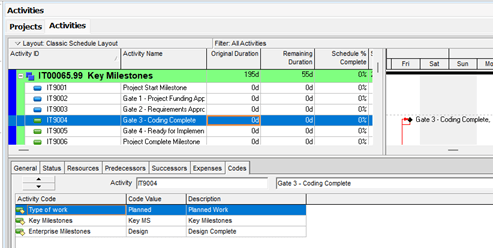
Milestones are part of progress requirements during project execution. To make handling the milestones smoother, you can build in unique IDs for them. This results in easy filtering, grouping, and sorting. You can also use activity codes to assist with the process. Keep in mind that you are looking for complete updates during execution, not only on activity progress, but milestones as well. It can be tedious and time-consuming to have to run a check after each update to ensure the milestones are following the activity progress correctly. It is even worse to issue reports without ensuring all the milestones have been updated as required. Specific milestones should often be reflected only on specific reports, not every report. You can make this an easy process by ensuring that they are updated and coded accordingly. This is easily handled using unique IDs and activity codes.You can also utilize milestone tracking to track critical project events and deadlines easily.
Activities
What about activities? Your schedule activities need to be created at the correct level of detail: enough to be sufficient, but not too much. The activities require a definable scope of work, the resources required to complete the work, and a definitive boundary of when the work needs to be completed.Use Primavera advanced features to optimize the schedule and improve schedule accuracy. Here’s a little food for thought: are you leveling your project? Do you have layouts set up in Resource Assignments for use reviewing after updates? Do you have the correct dates reflected on specific progress points? Ensure coding is used so required reports are easy to produce. Once the project is created, reviewed, and signed off on, do not forget to create the baseline.
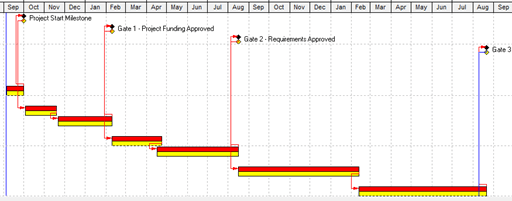
The baseline is used for tracking progress, and helps identify deviations. It also helps enable What-if scenario planning.
Constraints in a schedule have a purpose but need to be used correctly, and it’s important to avoid overusing them. Overuse can lead to unrealistic expectations, to say nothing of an update nightmare.
Resources
Use reviews of resource assignments and resource utilization, highlighting potential over and under utilization. Below is an example of a resource profile available in P6. Resource overloads in this case are evident and need to be addressed before the schedule can be finalized. A resource overload is signaling that there is more work in that time frame of the schedule than there are available resources to complete it.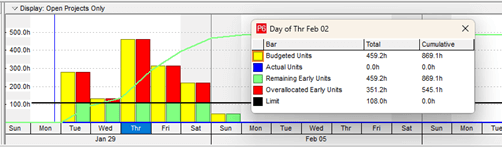
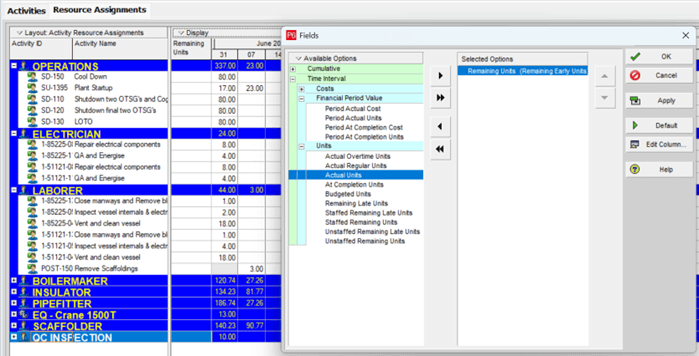
The resource assignments tab allows users to view and add resource/role assignments to activities in current projects. The tab provides a resource usage spreadsheet that displays resources and cost over time. The layouts can be customized to suit specific needs.
WBS and Codes
Establish a clear WBS and code structure to organize and maintain the schedule.It’s important to do regular reviews and analysis of schedule performance. Utilizing metrics like SPI, CPI, CP, float analysis, and work gap analysis can assist with identifying issues, and from there you can make decisions on the best path forward.
Any invalid dates or resources identified in the schedule should be corrected to maintain schedule integrity.
Keep in mind that Financial Period Calendars are available in P6 Professional. Using this functionality, users can define global financial period calendars and customize them to fit the organization’s financial reporting schedule. Using these calendars with the store period performance functionality in P6 after summarizing the project, you are able to store the period performance data such as actual costs, earned value, and actual units in the specific calendar periods. This information can be used for evaluating performance over time.
The P6 schedule provides information valuable in collaboration and communication amongst the project team and stakeholders to maintain a shared understanding of the schedule.
About the Author
Mary Lynn Backstrom, PMP, PMI-SP, PMI-BA – Implementation Specialist
Mary Lynn spent many years filling a variety of project controls duties such as planning, scheduling, analyzing, training and continuous improvement in the Aerospace Industry. Since joining Emerald in 2008, she has been a tremendous asset to the Emerald team. She has worked as a lead scheduler for turnarounds, led sessions for review and troubleshooting of scheduling and reporting, created and given custom training courses for clients, and is a sought after Primavera P6 trainer.
Mary Lynn enjoys some very diverse spare time activities. Along with a variety of outdoor activities such as gardening, she also enjoys making life size lawn ornaments for special holidays like Christmas. Mary Lynn is known for her participation in the community as well. You may have seen her walking in fundraisers in Edmonton and Calgary for the Cancer Society.
