Primavera P6 Scheduling - Turnaround Execution
In deleting the activities, you are removing easy reference to the whole project from the point of removal of that first activity from your progress schedule file. It is not just one scenario to consider here. Removing de-scoped activities without any progress posted to them is one thing, but also consider the de-scoped activities that were started prior to being de-scoped. If you remove the activity being de-scoped when the activity already has actual hours posted to it, the issue is compounded – you now are not only missing budget information from the deleted activity, but a true representation of all the actuals and earned value on your project is now not available. You are not just missing baseline budget information references.
The best approach is to keep all the project information in the file and when an activity is de-scoped, cancel it. Using this process, the cancelled activity can no longer affect the duration or budget/remaining hours on the project, but at the same time, all activities de-scoped at any point in the project can be accurately reported from within your P6 project schedule file. You can accurately report on the entire project and not just certain pieces of information. So, please keep in mind all of the information for an activity and the project you are impacting when you remove an activity from the schedule.
Another issue frequently observed is with completion of updates and progress in your execution file. Correct rescheduling of remaining work requires complete updates and complete logic. If you are observing incomplete logic in the schedule, either in the original schedule activities or in added work activities (or both), the missing information needs to be incorporated into the schedule file. Missing logic leaves the impact of dependencies between activities out of the reschedule equation. In general, open-ended activities display an incorrect, large amount of float. With each project update and reschedule to achieve the most accurate results possible, we need to utilize the most complete, accurate information available at the time of the update.
In the simple example below, the Install Scaffolding activity is not updated (PRE-100). The completion of the remaining work on the two Shutdown activities listed after that activity have been delayed because of the incomplete Install Scaffolding activity.
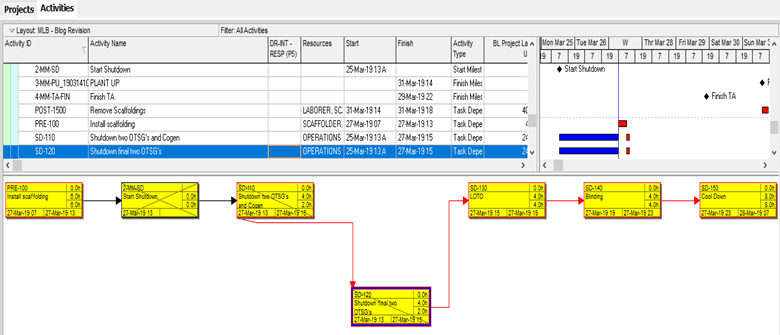
Often, the delay in the out-of-sequence is much larger than this small example and can result in activities being pushed considerably late when, in fact, the activity in the field is not actually being delayed. What is represented in the schedule needs to be synchronized with what is happening in the field. In this case, I suggest confirming the scaffolding installation is complete, and update as required.
Open ends should be addressed progressively as activities are added to the schedule, and before reports are generated. It is important that the schedule is calculated using logic as complete and correct as possible at the time of the update. This will produce the most accurate and reliable results.
Another element is keeping the logic in the progress file in sync with any revisions to the execution plan. Of course we all wish that the execution would not deviate from the initial execution plan, but we also know that the chances of that actually happening are slim to none. We must be prepared for required changes, and ensure that they are incorporated into the progress file to keep the schedule correctly reflecting what is actually happening in the field.
Below are a couple of very small examples for open ends. In a turnaround schedule, the list is normally much longer, but the missing information issue is the same. Each activity, other than the start milestone and finish milestone for the project, should have at least one predecessor and one successor.
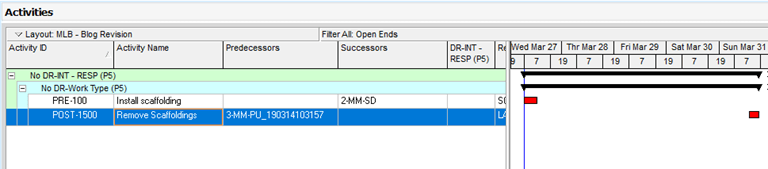
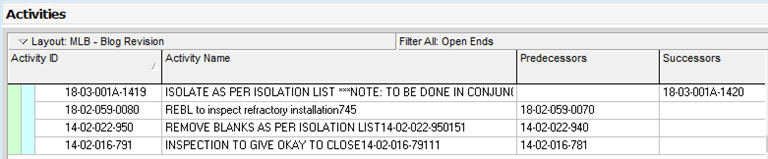
Keep in mind that the way P6 addresses open ends for predecessors and successors in schedule calculations, as well as the impact on the resulting update with open ends, is easy to anticipate.
Resource profiles and tracking are a required step in turnaround scheduling. It is common to have specific arrangements with subcontractors for specific resources, but you also want to be able to confirm that in the master schedule there are no lurking resource issues. Some of the available view options in the resource profiles are “By Resource” or “All”.
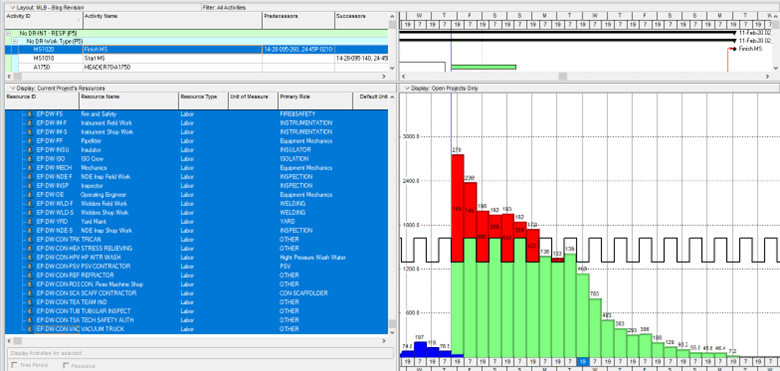
The activity usage profile is useful as well to easily spot areas of overload. This is not used to isolate the specific resources that are overloaded, but to view any spike in resource requirements in the activity usage profile.
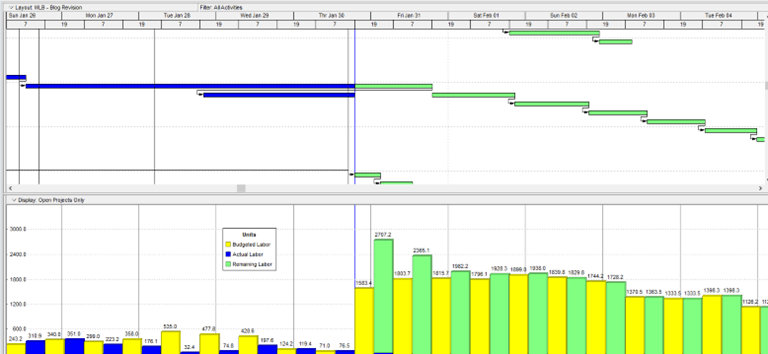
Empower your team with the tools to update the schedule quickly and easily, and also equip them with knowledge of the different views available to drill down or roll up to the desired level, allowing you to focus on required specifics at any given time.
About the Author
Mary Lynn Backstrom, PMP, PMI-SP, PMI-BA – Implementation Specialist
Mary Lynn spent many years filling a variety of project controls duties such as planning, scheduling, analyzing, training and continuous improvement in the Aerospace Industry. Since joining Emerald in 2008, she has been a tremendous asset to the Emerald team. She has worked as a lead scheduler for turnarounds, led sessions for review and troubleshooting of scheduling and reporting, created and given custom training courses for clients, and is a sought after Primavera P6 trainer.
Mary Lynn enjoys some very diverse spare time activities. Along with a variety of outdoor activities such as gardening, she also enjoys making life size lawn ornaments for special holidays like Christmas. Mary Lynn is known for her participation in the community as well. You may have seen her walking in fundraisers in Edmonton and Calgary for the Cancer Society.
